
Digital Writers' Rooms: Pitch Workflow

Digital Writers' Rooms: Pitch Workflow
I judge a pitch workflow by 3 things: who owns the idea, who handles the rewrite, and which draft has approval. Before edits start, I name the writer and approver and choose one official draft. Draft history alone isn’t sign-off.
Here’s how I compare the options:
- Unified screenplay workspace: Keeps pages, notes, and history together, but still needs clear approval rules.
- File-based workflow: Supports offline work and delivery, but requires manual indexing, merging, and version checks.
- Chat-based workflow: Helps teams discuss pitches, but decisions and assignments need a lasting record outside the thread.
Quick Comparison
| What I check | Unified workspace | File-based | Chat-based |
|---|---|---|---|
| Pitch context | Beside the script | Linked brief and index | Thread plus saved summary |
| Notes and rewrite owner | Assigned, scene-linked notes | Notes register and merge owner | Written assignment after discussion |
| Draft history | Named checkpoints | Versioned files and backups | Official draft link and archive |
| Approval and delivery | Decision tied to verified export | Sign-off tied to exact file | Saved approval tied to fixed pages |
| Cost and growth | Seat fees, limits, and training | Storage and coordination time | Access and recordkeeping time |
Before choosing, I’d test each option with 3 pitches, a 4-scene outline, 1 draft, and 6 notes. I’d check whether a new writer can find the selected pitch, assigned changes, current pages, and approval status - then compare year-one costs, including staff time.
My handoff rule: <u>no delivery without an exact version and recorded human approval.</u>
1. Unified Screenplay Workspace
Pitch records and context
Keep pitch notes, script changes, and approvals in one record. In Scriptwood, attach the pitch premise, format, and rewrite notes to the script. Before revisions begin, record the pitch owner, next action, and final approver. Use custom pitch statuses and a separate decision log - don’t bury approvals in draft names.
Notes and rewrite ownership
Give each comment a named writer, requested change, priority, and status. Real-time editing works only when everyone knows who owns each change. Use beat and act rewrites to address structure, scene rewrites to address sequence, and dialogue rewrites once the scene’s purpose is clear.
Draft control and recovery
Once notes are assigned, save milestone versions as named drafts to protect the draft trail. Before review, compare the current draft with the last approved draft to check for deleted beats, accidental changes, and story drift. Version history and restoration let the room recover earlier material without rebuilding it from attachments.
Approval and handoff
Treat coverage and the AI Consultant as advisory only. Record the human approver, approval date, exact draft, and any approval conditions. Export only the verified draft, then inspect the export before delivery. This ties the handoff to a verified set of pages, not a conversation thread.
sbb-itb-609c31f
2. File-Based Workflow
Pitch records and context
In a file-based room, the pitch starts outside the script. Store each pitch brief in 01_Pitch, including the logline, format, audience, story engine, and open questions. Keep a live pitch index that links each brief to the latest notes, script draft, and approval status. Shared storage alone doesn’t tell you which source file is current. The coordinator must keep those links up to date.
Notes and rewrite ownership
Keep notes in separate documents, tied to the draft through stable scene or page references. Gather all feedback in one register, and assign one person to merge changes into the source file.
Draft control and recovery
Keep the editable screenplay separate from review PDFs and delivery exports. Give the source file, review PDF, and notes snapshot the same version ID, then archive replaced packages as read-only. Store backups in at least two locations. Don’t count on overwritten files for recovery.
Approval and handoff
Keep a separate approval register for approved for rewrite, internal review, and approved for production. Link each decision to a locked review copy. Files allow offline review and external delivery, but the coordinator must check that the source file, export, and approval record match.
Chat-based rooms move faster, but keeping these same records gets harder.
3. Chat-Based Workflow
Pitch records and context
Chat helps writers test ideas quickly, but details get scattered across threads. Move the selected pitch into a permanent record in the script workspace. Include the pitch title, logline, selected format, owner, approver, and open questions. Link the original thread so writers can revisit the discussion without mistaking every suggestion for a decision. This keeps a lively discussion from turning into a vague agreement.
Notes and rewrite ownership
A chat note is not a script change. Free-flowing discussion can make ownership unclear. Label notes as brainstorm, assigned, approved, or rejected. After review, turn accepted notes into assignments with an owner, scene or sequence, and due date. Only then should the team edit the working draft.
Draft control and recovery
Treat attachments as notifications, not the official draft. Threads can leave competing copies in circulation; one script workspace keeps the team working from the same source. Use one shared draft with draft history, assign a single publisher for each revision, and link assignments to that draft.
If edits diverge, pause work and compare changes against the last approved version. The script owner decides what to merge or restore. Once the page set is stable, save that decision in the record.
Approval and handoff
A chat approval comment is not a complete approval record. Chat is immediate, but approvals can get buried in thread history. Add the decision to the draft record, along with the version, approver, date, and any exceptions. Use chat to announce delivery, but keep the delivered pages and response deadline in the record. Set a firm rule: no external handoff without a version identifier.
Next, test the process with a live pitch and one approved draft.
what does a writers room schedule look like
4 Workflow Tests: From Pitch to Approved Pages
Pitch Workflow: From Brief to Approved Pages
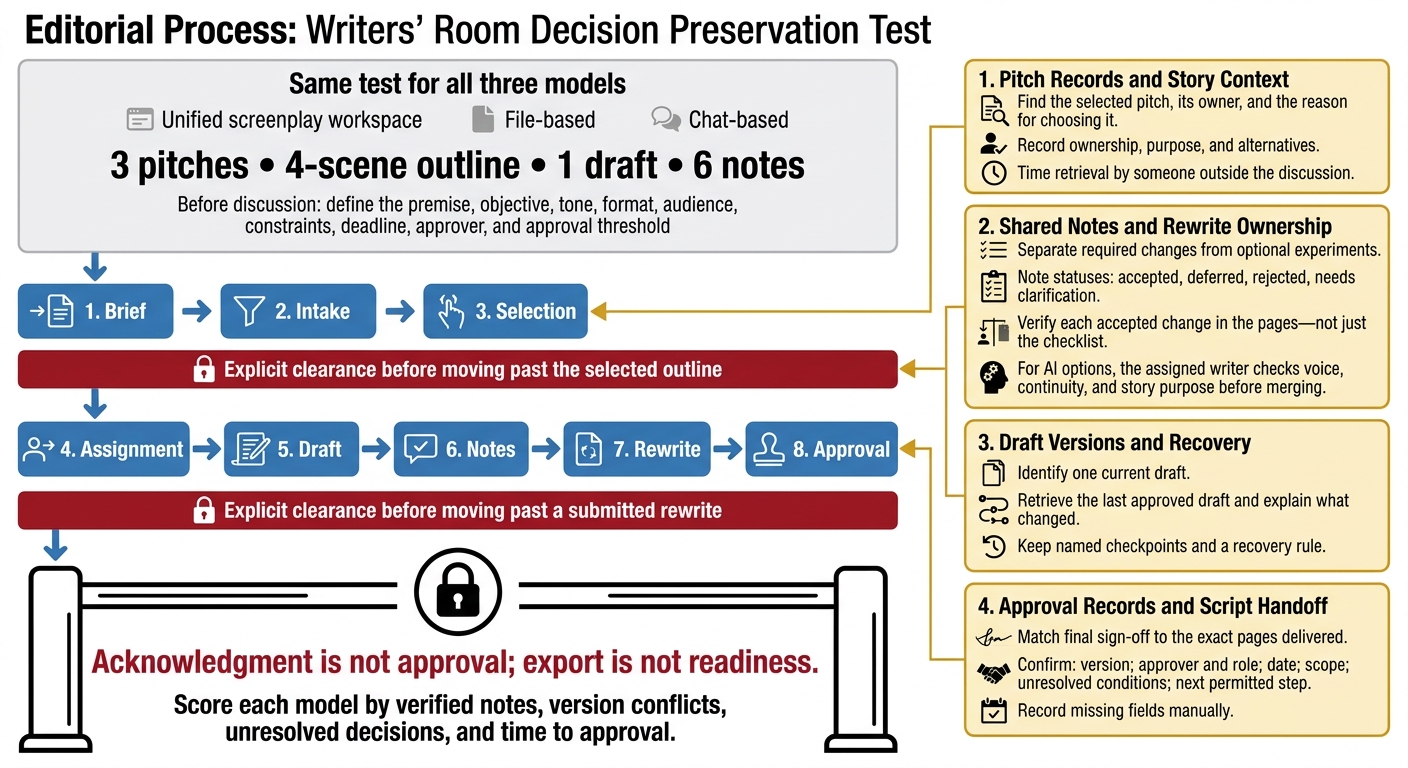
These tests check whether pitch decisions carry through to approved pages without drifting. Give all three models the same brief: three pitches, a four-scene outline, one draft, and six notes. Follow the same sequence: brief → intake → selection → assignment → draft → notes → rewrite → approval. Before discussion starts, define the premise, objective, tone, format, audience, constraints, deadline, approver, and approval threshold. Require explicit clearance before moving past the selected outline or a submitted rewrite.
The test isn't which room talks fastest. It's which one keeps the decision intact.
Pitch Records and Story Context
Time how long someone outside the discussion takes to find the selected pitch, its owner, and the reason for choosing it. At intake, check whether each model records ownership, purpose, and alternatives.
| Workflow model | Record method | Owner | Verification | Failure point |
|---|---|---|---|---|
| Unified screenplay workspace | Pitch record beside outline and script | Named pitch owner | Retrieve purpose, alternatives, and selection reason | Incomplete record |
| File-based | Dated decision memo | Owner named in memo | Match context to scene references and version ID | Memo separated from pages |
| Chat-based | Thread plus lasting summary | Owner named in summary | Retrieve selected direction and original discussion | Decision buried in discussion |
Once the pitch is selected, check whether its context carries into assignments.
Shared Notes and Rewrite Ownership
Check whether accepted changes reach the pages and the setup fields stay attached to the rewrite assignment. Separate required changes from optional experiments. Use four statuses: accepted, deferred, rejected, and needs clarification. Verify each change in the pages - not just the checklist. When AI supplies scene or dialogue options, the assigned writer must check voice, continuity, and story purpose before merging them.
| Workflow model | Record method | Owner | Verification | Failure point |
|---|---|---|---|---|
| Unified screenplay workspace | Scene-linked notes or project record | Named assigned writer | Check accepted notes against revised text | Status changes without page changes |
| File-based | Annotated draft and revision memo | Writer named in memo | Compare submitted pages with memo | Notes omitted during merge |
| Chat-based | Thread plus assignment summary | Writer named in summary | Match accepted notes to delivered pages | Decisions lost between thread and draft |
Draft Versions and Recovery
Check whether each model identifies one current draft. Retrieve the last approved draft and explain what changed. Version history helps, but the room still needs named checkpoints and a recovery rule.
| Workflow model | Record method | Owner | Verification | Failure point |
|---|---|---|---|---|
| Unified screenplay workspace | Designated working draft and history | Script owner | Retrieve checkpoint; compare revised text | Shared mistakes or stale exports |
| File-based | Versioned files and delivery log | Source-file owner | Compare files; restore archive or backup | Overwritten files or duplicate copies |
| Chat-based | Current-draft link and linked archive | Designated publisher | Compare linked versions; retrieve approved draft | Participants follow different links |
Approval Records and Script Handoff
Check whether final sign-off matches the exact pages delivered. Confirm the version, approver and role, date, scope, unresolved conditions, and next permitted step. Record missing fields manually. Acknowledgment is not approval; export is not readiness. Score each model by verified notes, version conflicts, unresolved decisions, and time to approval.
| Workflow model | Record method | Owner | Verification | Failure point |
|---|---|---|---|---|
| Unified screenplay workspace | Explicit project decision | Designated approver | Match named draft, conditions, and export | Export differs from approved draft |
| File-based | Approval memo or email | Named approver | Match exact filename, archived copy, and delivery checklist | Delivered file differs from approved copy |
| Chat-based | Explicit approval plus lasting record | Named approver | Match preserved attachment or version-specific link and conditions | Approval points to changing pages |
Next, measure what happens as the room grows and the record load increases.
Costs and Limits as the Room Grows
Keeping workflows accurate takes more time and money as the room grows. Compare year-one costs, not just subscription prices. Ask for an estimate that covers seat fees, storage, exports, migration, training, support, and usage charges. Count the staff time needed to track the selected pitch, rewrite owner, and approved draft, too. Existing file storage or chat access may cut software costs, but it won’t remove that work.
The question is no longer just how well you track decisions. It’s what that tracking costs as you add seats and revisions.
| Model | Advantages | Disadvantages | Best-fit conditions | Controls |
|---|---|---|---|---|
| Unified screenplay workspace | Fewer handoffs, despite higher recurring costs. | Plan limits, onboarding time, and vendor dependence. | Growing teams with frequent rewrites and multiple approval stages. | Check plan limits, permissions, history retention, and backup access. |
| File-based workflow | Low software cost and offline access. | Manual merging and more admin time as work grows. | Small, stable teams with modest revision volume. | Keep a controlled working copy and a read-only archive. |
| Chat-based workflow | Fast discussion with little setup. | Decisions can drift, adding recordkeeping work. | Small groups with limited pitch volume; larger rooms need a lasting script record. | Assign a decision-log owner to preserve version-specific approvals. |
Scriptwood connects the work, but plan limits and record rules still determine who owns a rewrite and what counts as approved.
Test onboarding before adding more seats. Give a newly assigned writer project access. Ask them to find the selected pitch, accepted notes, rewrite owner, current draft, and approval status. Track how many searches and handoffs they need, and check whether the answers agree. Test workspace navigation, the file index, or pinned decision-log links - not their ability to piece together message history.
The test fails if the writer needs private messages, guesses from filenames, or can’t tell submitted pages from approved pages. Fix the missing record or access rule, then run the test again.
Conclusion: Choose a Workflow with Clear Records
The right workflow makes a pitch traceable from the first discussion to approved pages. Use chat for discussion, files for delivery, and a unified workspace when the record needs to stay connected from pitch to approval.
A workspace helps only when the rewrite owner, each note’s outcome, and the approver’s decision link to a specific draft or page range. Approval records should identify the change, approver, date, and authoritative version. The table separates built-in support from team discipline, showing where each workflow keeps - or loses - that record.
| Criterion | Unified screenplay workspace | File-based workflow | Chat-based workflow |
|---|---|---|---|
| Pitch records | Linked pitches; explicit owners and decisions | Separate briefs; consistent indexing | Fast proposals; lasting summaries |
| Contextual notes | Scene-linked feedback; clear outcomes | Separate annotations; reliable cross-references | Fragmented threads; preserved decisions |
| Rewrite flow | Connected revisions; assigned ownership | Controlled replacements; duplicate-copy risk | Quick requests; transfer to script required |
| Version control | Draft history; named checkpoints | Archived copies; strict naming | Draft links; stale-reference risk |
| Approval clarity | Draft-linked decisions; named approver | Preserved sign-offs; exact approved copy | Buried approvals; separate record needed |
| Handoff readiness | Connected context and export; verified pages | Delivery packages; accurate labeling | Scattered context; organized handoff required |
Workflow, not headcount, determines whether the record stays usable as the room grows. When choosing a workflow, check whether it keeps pitch context, rewrite ownership, version, and approval together in one lasting record.
FAQs
How should we resolve conflicting rewrite notes?
Tie feedback to a specific scene or line, and base it on scene goals, pacing, or character arcs - not personal taste. Use Scriptwood’s draft comparison tools to review competing versions side by side.
If you’re stuck, save both versions and return to them after a day. The AI consultant can help you examine character motivations or how each version affects the story’s structure. Follow decision rules you’ve already agreed on, such as assigned section ownership, to keep the work moving.
What happens if approved pages need changes?
Keep approved pages intact. Use Scriptwood’s version history to test changes in a separate working version without overwriting the master draft. Then use the Draft Comparison tool to review edits side by side with the approved version, checking what’s fixed and whether new conflicts have appeared.
Once the rewrite is final, record the decision and move the updated scene into a clean draft to keep a clear revision trail.
How can we move active pitches into one workspace?
Keep drafts, feedback, and revisions in Scriptwood. Add notes directly to the shared draft with inline comments linked to specific scenes or lines. Set clear deadlines and assign permissions that fit each collaborator’s role, such as comment-only access.
Use AI coverage for first-pass notes on structure and characters. Track changes with Draft Comparison and History, restore earlier versions when needed, and make sure everyone reviews the current draft.