
How to Get Script Coverage Without Hiring a Reader
How to Get Script Coverage Without Hiring a Reader
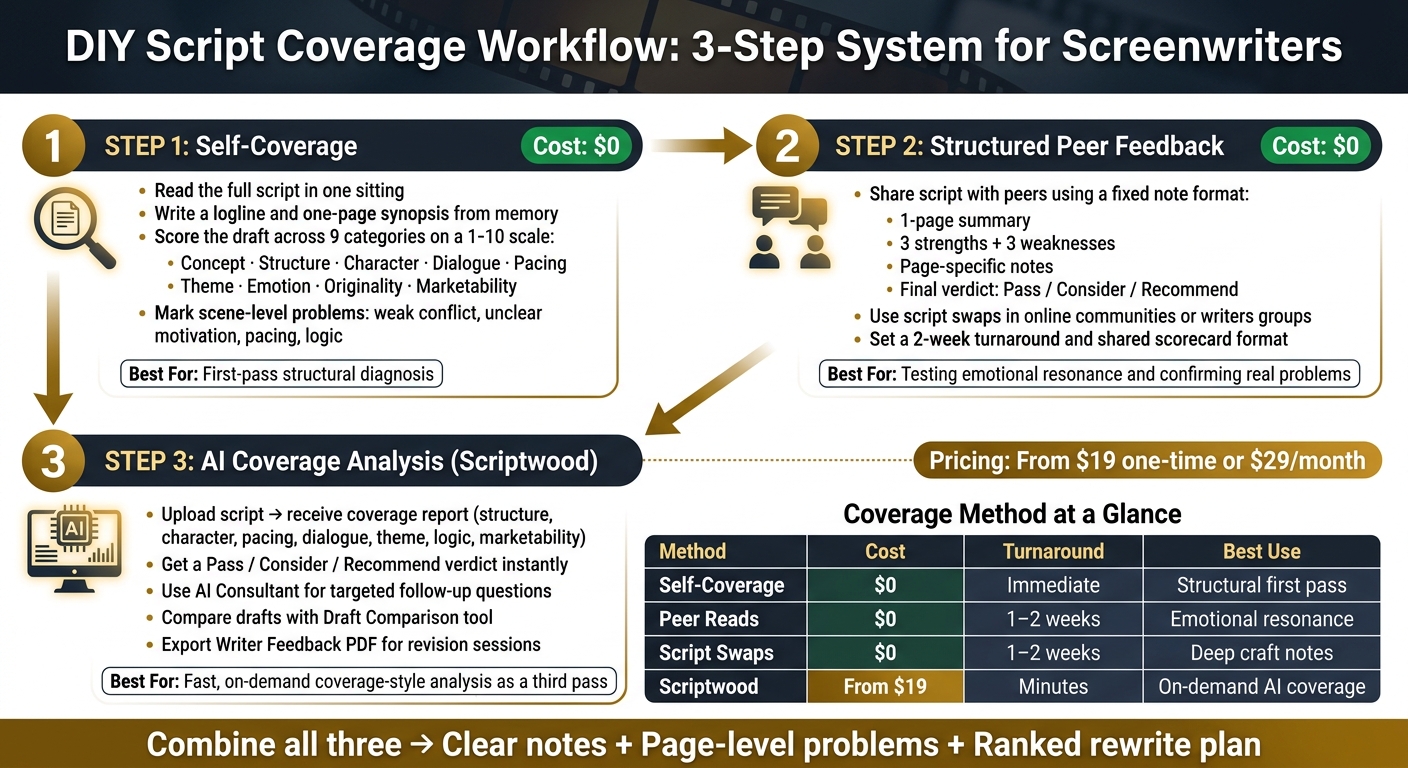
You do not need to pay for every script read to get useful notes. I’d use a 3-step setup: self-coverage, structured peer feedback, and AI analysis. That mix helps me spot story problems, rank fixes, and decide if a draft is ready to share.
Here’s the short version:
- I start with a full read in one sitting.
- I write a logline and a one-page synopsis from memory.
- I score the draft in key areas like structure, character, dialogue, pacing, theme, emotion, originality, and marketability.
- I ask peers for notes in one fixed format, not random opinions.
- I use Scriptwood as a third read for coverage-style reports, scene notes, draft comparison, and a Pass / Consider / Recommend verdict.
- I put all notes into one revision file and fix the lowest-scoring issues first.
A simple process like this matters because script coverage can stack up fast in cost. At $19 one-time for one Scriptwood coverage or $29/month for two coverages, AI review can cost far less than paying for repeated human reads, while self-notes and peer swaps can cost $0.
DIY Script Coverage Workflow: 3-Step System for Screenwriters
AI Script Coverage PART TWO! #ai #screenwriting #film
sbb-itb-609c31f
Quick Comparison
| Method | Cost | Best For | Main Limit |
|---|---|---|---|
| Self-coverage | $0 | First-pass story check | I can miss my own problems |
| Peer reads | $0 | Testing how the script lands | Note quality can vary |
| Scriptwood | $19 one-time or from $29/month | Fast coverage-style analysis | It still needs my judgment |
Bottom line: if I want script coverage without hiring a reader, I don’t try to copy a studio process word for word. I build a simple system that gives me clear notes, page-level problems, and a ranked rewrite plan.
What Script Coverage Is and What You Actually Need
Script coverage is a written evaluation of a screenplay. After reading the full script, a reader usually sends back a logline, a synopsis, category scores, and a final verdict: Pass, Consider, or Recommend.
For most writers, the part that helps most is the page-by-page revision feedback that points to what needs work. That’s the big reason coverage fits a low-cost process so well. You can rebuild those same parts with checklists, peer reads, and script analysis tools.
The Core Parts to Recreate in a DIY Coverage Process
If you want to rebuild coverage on your own, focus on six parts.
The logline checks whether the core idea is clear. It should identify the protagonist, their goal, the main conflict, and the stakes. If that falls apart in one sentence, the script often has a deeper story issue.
The synopsis should exist in two versions: a one-paragraph summary and a one-page summary. Together, they test whether the beginning, middle, and end still make sense when the story is stripped down and read by someone else.
The scorecard is where coverage becomes useful on a practical level. Readers score key craft areas such as structure, character, dialogue, pacing, logic, and marketability, often on a 1–10 scale. Those numbers give you a fast snapshot of where the draft stands.
The revision notes explain the scores with page references and direct comments. That context matters. A low score without an explanation doesn’t help much.
Then there’s the overall verdict. This sums up the script with a Pass, Consider, or Recommend label.
Script-assisted analysis can produce this same type of breakdown, which becomes handy once you shift from defining problems to fixing them.
Professional Coverage vs. DIY Coverage: A Side-by-Side Comparison
| Element | Why It Matters | Professional Coverage | DIY Coverage |
|---|---|---|---|
| Logline | Tests if the core conflict is clear | Distills the script into 1–2 sentences | Use: [Protagonist] must [Goal] or face [Stakes]. |
| Synopsis | Identifies plot holes or pacing issues | Summarizes the beginning, middle, and end | Write a one-page summary and flag gaps or logic breaks. |
| Scorecard | Provides an objective health check | Assigns 1–10 scores to craft elements | Use a checklist for dialogue, pacing, character arcs, and logic. |
| Verdict | Simulates an industry gatekeeper's reaction | Labels the script Pass, Consider, or Recommend | Ask: "Would you recommend this to a producer?" |
| Marketability | Determines if the script has a target audience | Evaluates commercial potential against current trends | Identify clear audience fit and likely comps. |
Use these parts to answer the same questions a reader would ask before you start revising. Next, turn them into a self-coverage checklist and a peer-note process. With the core pieces set, the next move is building a repeatable coverage workflow.
Build a Low-Cost Coverage Workflow With Self-Notes and Peer Feedback
Use a Self-Coverage Checklist and Scorecard After Every Full Read
Start with a single-sitting read-through. Read the script from start to finish without stopping to edit or jot down notes. The point is to feel the pacing and emotional flow in one pass, like a reader would.
When you finish, write a one-page synopsis from memory. This is a simple stress test. If that synopsis feels hard to write, flag structure first.
Next, score the script across nine categories on a 1–10 scale:
- concept
- structure
- character
- dialogue
- pacing
- theme
- emotion
- originality
- marketability
Use the total score to rank your revision priorities. Then go scene by scene and mark problems. Label each issue clearly: weak conflict, unclear motivation, pacing, or logic. That makes it easier to separate big structural trouble from scene execution before you start rewriting.
Once you know where you tend to miss the mark, check those points against outside readers.
Ask Peers and Writers Groups for Structured Notes, Not Casual Reactions
When you share your script with a peer, ask for notes in a set format: a one-page summary, three strengths, three weaknesses, page-specific notes, and a final verdict of Pass, Consider, or Recommend. That pushes the reader to respond more like a professional reader, not just a friend saying what they liked.
Script swaps in online communities and local or online writers groups are free options that can give you craft-level notes from other writers. Before you swap, set a two-week turnaround and ask both readers to use the same note format. Otherwise, you can end up comparing apples to oranges.
The main problem here is uneven note quality. That's why it helps to give peers the same scorecard you use for self-coverage. It gives the feedback a clear frame, and that makes it easier to use.
Peer notes should tell you whether the problems you spotted are actual problems or just your own bias talking.
Use self-coverage for diagnosis, peer notes for confirmation, and script swaps for broader craft feedback.
Self-Coverage, Peer Reads, and Script Swaps: A Side-by-Side Comparison
Use this comparison to choose the fastest coverage step for your draft stage.
| Method | Cost | Turnaround | Depth of Notes | Main Risk | Best Use |
|---|---|---|---|---|---|
| Self-Coverage | $0 | Immediate | High (Technical) | Bias | First-pass structural check |
| Peer Reads | $0 | 1–2 weeks | Moderate | Uneven quality | Testing emotional resonance |
| Script Swaps | $0 | 1–2 weeks | High (Craft-based) | Unreliable partners | Deep-dive craft notes |
| Writers Groups | $0 | Monthly | Inconsistent | Groupthink | Long-term development |
How to Use Scriptwood to Get Coverage-Ready Analysis Without Hiring a Reader
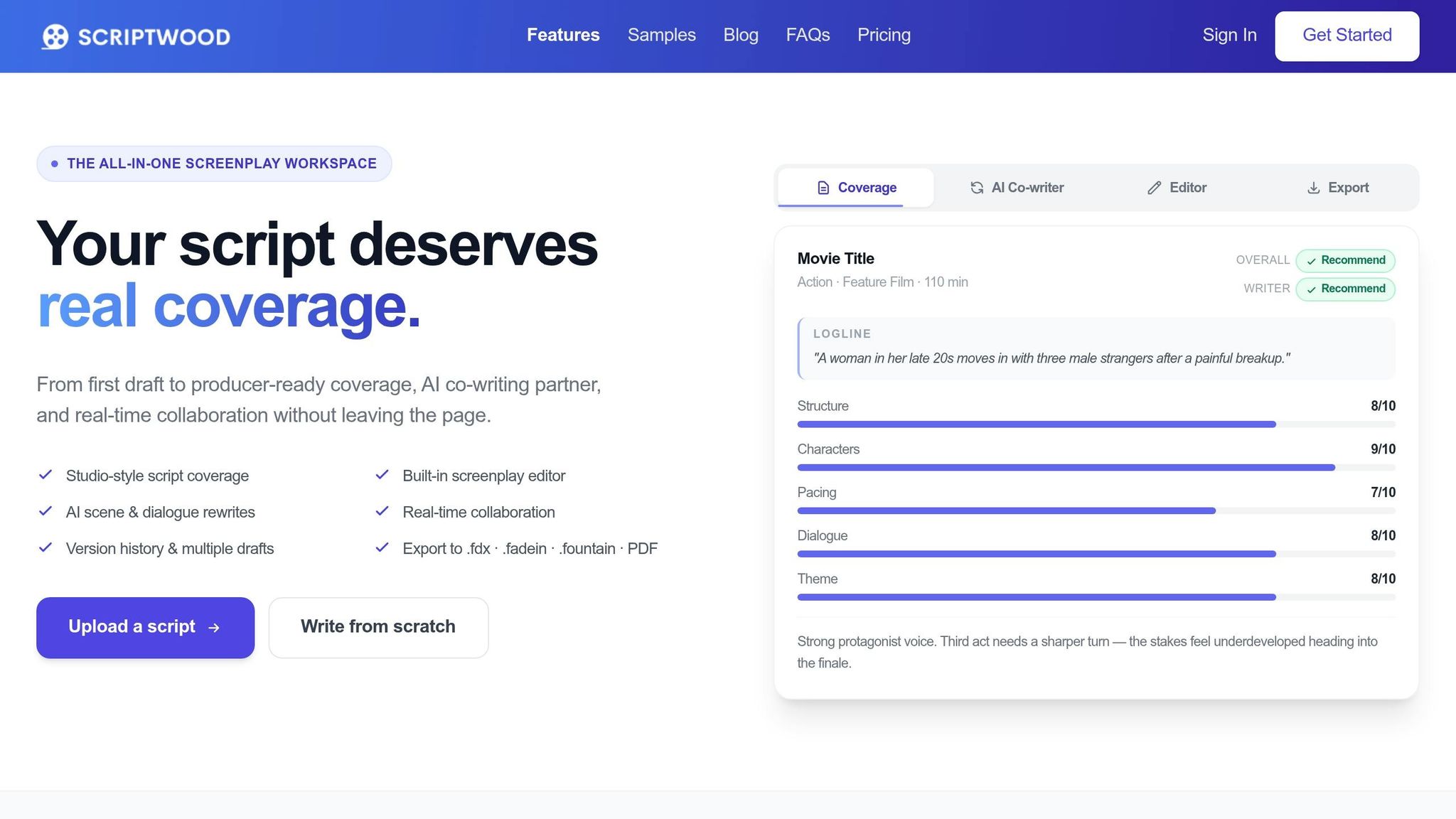
Self-coverage and peer reads can help a lot. The problem is simple: both take time, and both depend on who’s available. Scriptwood gives you on-demand, coverage-style analysis in minutes. A good way to use it is as a third pass - after your own notes and after peer feedback.
Generate Coverage Reports, Verdicts, and Scene-Level Follow-Up Inside Scriptwood
Upload your script, and Scriptwood generates a coverage report that looks at structure, character, pacing, dialogue, theme, logic, marketability, and an overall Pass, Consider, or Recommend verdict. That gives you a fast gut check on one key point: Is this script ready to go out, or does it need more work first?
If the report points to weak acts, fuzzy goals, or scene logic that doesn’t quite land, you can use the AI Consultant to dig deeper with follow-up questions. That matters because broad notes are helpful, but targeted questions often get you to the fix faster.
Scriptwood also exports a Writer Feedback PDF, which gives you a clean notes document to keep beside you while you rewrite.
Compare Drafts, Use Rewrite Tools, and Track Version History to Revise Faster
Scriptwood also includes a built-in screenplay editor. So you can start a script there or upload one you already have and handle revisions in the same workspace. Each save creates a named draft, which makes testing changes much less messy.
Here’s the practical upside:
- Try a structural change without losing your earlier version
- Compare the new draft against the old one
- Restore the earlier draft if the new approach falls flat
Draft Comparison helps you see whether a rewrite fixed the problem flagged in coverage. Pair that with the AI Writing Partner for scene rewrites, dialogue changes, or beat-level edits, and the process starts to feel a lot less painful. You’re not rebuilding the script from zero each time. You’re making targeted changes, checking the result, and moving forward. Those draft changes can also feed into your final notes document.
Scriptwood Plans for Solo Writers and Small Teams: A Side-by-Side Comparison
| Plan | Price | Coverage Limit | Collaboration | Key Features | Best Fit |
|---|---|---|---|---|---|
| Hobby | $19 one-time | 1 coverage | No | Standard processing, Coverage PDF, Writer Feedback PDF, Writing Editor, Draft Comparison, Draft History | One-off script analysis |
| Starter | $29/month | 2 coverages/month | No | AI Consultant, AI Writing Partner, Writing Editor, Coverage PDF, Writer Feedback PDF, Draft Comparison, Draft History, 20 AI credits/month | Active solo writers |
| Pro | $59/month | 5 coverages/month | Up to 2 collaborators | AI Consultant, AI Writing Partner, Final Draft export (.fdx), Faster processing, Writing Editor, Coverage PDF, Writer Feedback PDF, Draft Comparison, Draft History | Writing duos and small teams |
| Executive | $129/month | 15 coverages/month | Up to 10 collaborators | AI Consultant, AI Writing Partner, 300 AI credits/month, Priority processing, 4 export formats, Writing Editor, Coverage PDF, Writer Feedback PDF, Draft Comparison, Draft History | Small writing rooms and producers |
If you only need a single read on one script, Hobby is the low-commitment option. Starter makes more sense if you’re revising on a regular basis. Pro works well for co-writers and small teams, while Executive is built for heavier-volume use.
Turn Coverage Into a Revision Plan and a Final Notes Document
Build a Producer-Ready Coverage Summary and Rank Fixes by Impact
Put all of your notes into one working file before you start revising. Combine your self-coverage, peer feedback, and Scriptwood notes in a single revision document.
Start with a simple title page that includes:
- Script title
- Draft date
- Page count
- Logline
- Short synopsis
Then move into your strengths, followed by weaknesses tied to page numbers. Those page references matter. “The midpoint falls flat” is vague and tough to use. “The midpoint at page 55 doesn’t shift the protagonist’s goal” gives you something clear to fix in your next session.
Use the category scores to sort revision priorities. The platform ranks scripts across Logic, World Building, Structure, Characters, and Freshness on a 1–10 scale. Start with the lowest scores first. That helps you focus on the fixes most likely to change the draft in a meaningful way.
If peer notes clash with each other - or with your own read - use Scriptwood’s AI Rewrite & Chat to ask a focused follow-up question about that exact problem. This is where a vague disagreement can turn into a usable next step.
End the document with one verdict: Pass, Consider, or Recommend. That gives you a ranked fix list before you open the next draft.
Conclusion: The Most Reliable Low-Cost Coverage System Is a Combined One
Once the notes are in order, the script is ready for revision. Self-notes, peer notes, Scriptwood analysis, revision, repeat - that loop works on your current script and every script after it.
FAQs
When should I use AI coverage in my process?
Use AI coverage during revision when you need fast, structured feedback on character development, plot structure, pacing, dialogue, and market potential.
Because it can generate reports in minutes, it works well for finding scene-level weak spots, speeding up revision calls, and helping you iterate with follow-up questions, scene rewrites, or dialogue tweaks.
How do I know which notes to trust?
Trust notes that are specific and repeatable. Use AI-driven coverage as a first-pass read on structure, character development, pacing, dialogue, and marketability. Then check the flagged issues against the script itself to make sure they show up clearly on the page.
Scriptwood says its analysis is about 95%+ accurate, so put the most weight on notes that keep pointing to concrete scenes and clear problems you can spot in your draft. It also helps to save each version so you can compare results from one draft to the next.
What score means my script is ready to share?
A script is usually ready to share when it earns a Recommend rating in coverage.
Scores of 9 or 10 out of 10 in areas like logic, world-building, structure, character development, and freshness are a strong sign that the screenplay is polished and ready for professional consideration.
These scores can also help you spot scene-level weak points before you send the script out.