
AI Screenplay Tools: 8 Features Worth Paying For

AI Screenplay Tools: 8 Features Worth Paying For
If I’m paying for an AI screenplay tool, I want it to do one of three things: save me time, help me fix the right problems, or make handoff easier. In this article, the paid features that stand out are scene rewrites, coverage, beat generation, dialogue help, draft history, formatting, co-writing, and export options.
Here’s the short version:
- Scene rewrites help me test new versions of weak scenes without losing the original.
- Coverage and notes help me see what to fix first, with Scriptwood claiming up to 95% less evaluation time.
- Beat and outline tools help me catch story problems before they spread across a full draft.
- Dialogue help works best when I use it on scenes already flagged for weak voice.
- Draft comparison helps me track what changed and roll back if a revision misses.
- Formatting tools cut cleanup work inside the editor.
- Co-writing tools reduce file mix-ups and keep comments tied to the page.
- Export options matter when I need the right file for a producer, co-writer, or review round.
If I had to boil it down even more, I’d say this: pay for the features you use over and over. A solo writer may get the most from coverage, rewrites, and draft history. A team may care more about comments, permissions, and .fdx export.
Quick Comparison
| Feature | What I’d pay for | Best fit |
|---|---|---|
| AI Scene Rewrite Suggestions | Faster scene revision | Solo writers |
| Script Coverage & Notes Analysis | Better note triage | Writers, producers, teams |
| Beat & Outline Generation | Early story problem checks | Writers planning structure |
| Dialogue Refinement | Line and voice polish | Solo writers, partners |
| Draft Comparison | Clear version tracking | Writers in revision |
| Formatting Assistance | Less manual cleanup | Anyone drafting in-app |
| Co-Writing Collaboration Tools | Shared editing and comments | Co-writers, teams |
| Export Options | Clean handoff files | Writers, producers |
The bottom line: the article judges each feature by a simple test - does it make the script better, faster to revise, or easier to share? That’s the lens I’d use before picking any plan, whether it’s $29/month, $59/month, or more.
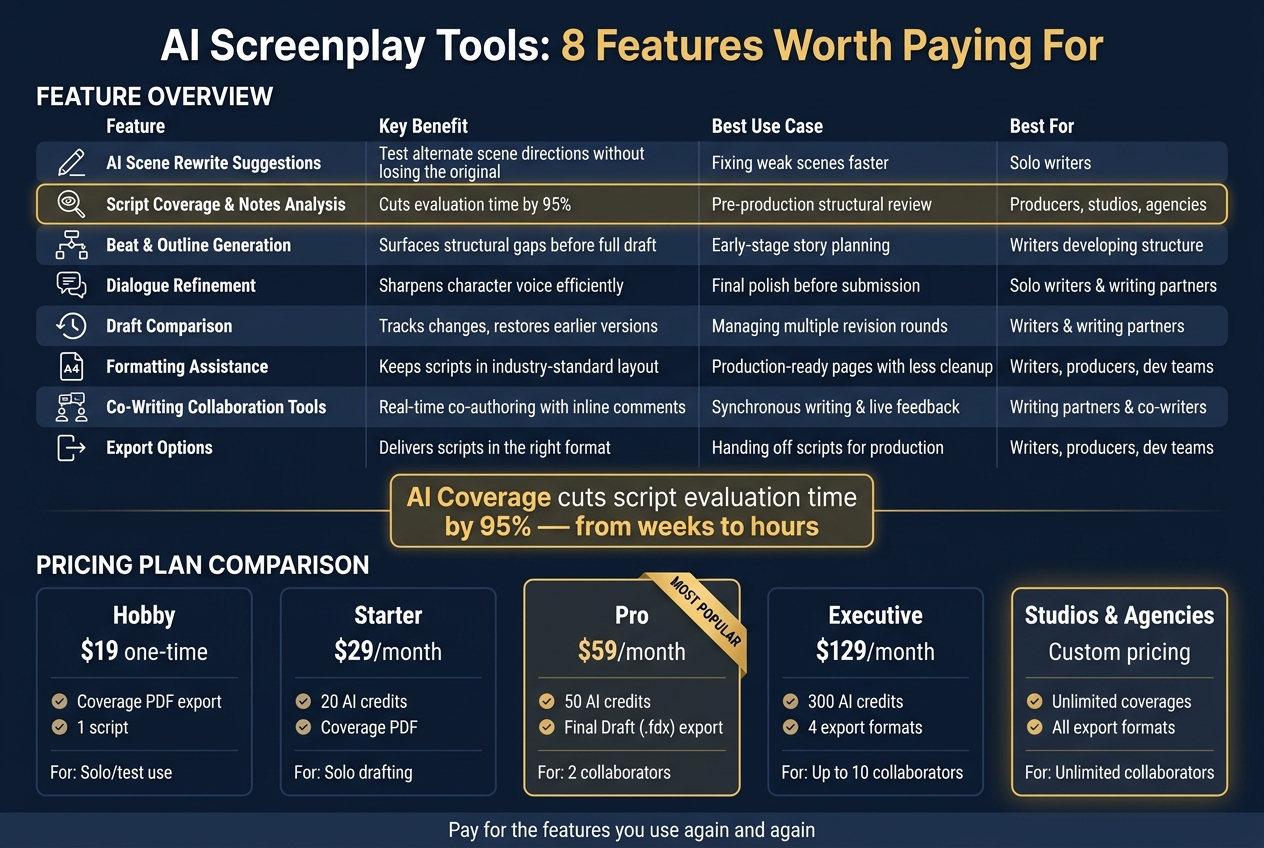
AI Screenplay Tool Features: Pricing Plans & What You Get
Laper AI Review: AI Screenwriting Tool for Scripts, Storyboards & Film Production 🎬 EP #490
sbb-itb-609c31f
1. AI Scene Rewrite Suggestions
AI scene rewrite suggestions make sense to pay for when they help you get through revisions faster without drifting from the draft you already have. That matters because writers often rewrite the same scene again and again before it finally clicks. These tools take your current script text, pair it with a clear prompt, and produce a new version of the scene. The big win is speed, especially when a scene needs more than small line-level fixes.
Time Saved in Drafting or Revision
The main time saver is faster iteration. You can review one rewrite, adjust the tone or dialogue, and then try again with a follow-up prompt. Scriptwood's AI has analyzed over 500 scripts.
One practical move: run a coverage report before you ask for a rewrite. If the coverage points out weak pacing or character issues, you can plug those notes straight into your prompt. That gives the AI a clear target instead of making it guess. Speed is helpful, sure, but what matters more is whether the rewrite deals with the scene's actual structure.
Improvement to Script Development Quality
This feature helps most when a scene has structural problems, not when it just needs nicer wording. Scriptwood's AI looks at structure, character, pacing, and dialogue at the same time. So a rewrite can deal with why a scene feels flat or slow, not just replace a few lines.
You can also try an AI rewrite without changing your original draft. If it doesn't work, you can restore the earlier version and test a new prompt. That lowers the risk. You're not losing work, and you're not boxed into one direction. When revision volume starts piling up, that kind of flexibility is easier to pay for.
Subscription Cost Justification
Rewrite features run on plan-based AI credits: 20 credits per month on the $29/month Starter plan, 50 on the $59/month Pro plan, and 300 on the $129/month Executive plan. In plain terms, Starter works for lighter revision needs, while Pro is a better fit if you're reworking scenes one by one more often.
Scriptwood also says it does not use your scripts or creative content to train its foundation models, so unpublished material stays private. For writers working on unreleased projects, that's a big part of the value too.
2. Script Coverage and Notes Analysis
If rewrites help you move faster, coverage helps you figure out what to fix first. In the past, script coverage often meant waiting days or even weeks for human notes. Scriptwood shortens that gap by processing an uploaded script and generating a report that reviews structure, character development, pacing, dialogue, and marketability. That turns coverage into a same-day revision step instead of a long delay.
Time Saved in Drafting or Revision
Scriptwood says AI coverage can cut script evaluation time by 95%, taking the process from weeks down to hours. That changes the rhythm of revision in a big way. Instead of letting a draft sit while you wait for feedback, you can run coverage, read the notes, and get back into the script that same day.
The platform delivers two report formats:
- A Coverage PDF for producers
- A Writer Feedback PDF focused on scene-level fixes for the writer
That split matters. A producer usually wants the big-picture read, while a writer needs notes they can act on line by line and scene by scene.
Improvement to Script Development Quality
The report doesn't just point out problems. It turns them into revision targets. Scriptwood says its AI reaches 95%+ accuracy when identifying story elements and market potential. So if a scene gets flagged for pacing, you're not stuck guessing what the note means.
You can also use the built-in AI Consultant to ask follow-up questions about a note before making changes. That's useful because vague feedback can slow a writer down. Clear follow-up guidance can do the opposite. It turns notes into prompts you can work with right away.
Team Handoff or Collaboration Value
Once the notes are clear, the next job is getting everyone on the same page. Scriptwood lets teams export coverage reports as PDFs or share them by link, which helps writers and development teams work from the same set of notes.
That may sound simple, but it's a big deal in practice. Fewer mismatched versions. Less back-and-forth over what the feedback said. More time spent on the script itself.
Subscription Cost Justification
The value comes down to how often you use coverage. The $19 one-time Hobby plan covers one script and gives individual writers a low-risk way to try the feature. For people who only want to test a draft or get a quick read on one project, that price point makes sense.
For heavier use, Scriptwood points to its Executive and Studios & Agencies plans, which are aimed at teams that need unlimited coverages and custom pricing. If you're running notes across many drafts or juggling a slate of projects, the math shifts from cost per report to how much time the workflow saves.
3. Beat and Outline Generation
Coverage tells you what's off. Beat and outline generation helps you fix it before the draft drifts too far.
Once you know where the story is weak, the next job is simple: figure out whether the structure can carry the fix. If it can't, you're better off finding that out early than after you've written 90 pages in the wrong direction.
Time Saved in Drafting or Revision
Scriptwood's AI Writing Partner and AI Consultant let you generate beat-by-beat feedback and ask follow-up questions about your structure in the same workspace you're drafting in. That's a big deal because you can test an act structure or try a new run of beats much earlier, before the draft pushes you down a path that doesn't work.
Instead of waiting until revision to spot a problem, you can stress-test the shape of the story while it's still easy to change.
Improvement to Script Development Quality
Speed isn't the main thing here. What matters is whether the outline actually works.
That kind of close review helps when you're trying to spot a dragging second act, or when a scene order and payoff just don't hit the way they should. Use the AI Consultant to test why a beat fails or what alternate motivation makes it stronger.
Here's one practical move that can save a lot of pain: use Draft History when you're trying a new outline direction. If the new structure falls apart, restore the earlier version and keep going.
Team Handoff or Collaboration Value
When a producer needs a fast read on the structure, AI-generated analysis gives them something concrete to react to. Producers can comment on beats in the same workspace, which keeps notes tied to specific story points.
That matters in handoffs. Instead of vague feedback like "the middle feels off", the team can react to the exact beat where the story starts to sag.
After structure comes line-level work: the next feature should help the script sound like people actually say it.
4. Dialogue Refinement
Once the structure is working, dialogue is usually where weak writing starts to stand out.
Time Saved in Drafting or Revision
Dialogue revision is slow by nature. You read lines out loud, second-guess word choices, and stop to ask whether a character would even say that. It takes time.
AI dialogue rewrite tools can speed that up by helping you fix a line or short exchange without reworking the entire draft. So instead of rewriting a full scene just to try a different tone, you can generate a new version in minutes and compare it with the original. If a line still feels flat, coverage can help show why.
Improvement to Script Development Quality
The bigger problem is when every character starts to sound alike. That happens more often than writers want to admit. Coverage can flag flat voices before you begin rewriting, which gives you a clearer place to start.
Use coverage to spot the characters or scenes that need voice work first. Then the AI Consultant lets you ask follow-up questions about that coverage before making changes.
Best use: run coverage first to find which characters sound flat, then use AI credits to refine those specific scenes, not the whole script at once.
Subscription Cost Justification
That matters because dialogue rewrites can pile up fast. Draft History lets you test a rewrite and restore the original instantly. That makes dialogue experiments low risk, so you can spend credits only on the revisions that actually improve the scene.
5. Draft Comparison
After the rewrites are done and coverage is in, version history helps you see which changes paid off. That matters more than it sounds. A lot of writers end up guessing which draft was stronger because the edits start to blur together. Here, every save becomes a named draft, so you can look through the history and restore the version you want.
Time Saved in Drafting or Revision
Draft history cuts out one of the most annoying parts of revision. If you've ever compared two drafts by hand, you know the drill: read one, read the other, scroll back and forth, and hope nothing slips past you. It takes time, and small changes are easy to miss.
One simple habit helps a lot: give test drafts clear names, like "Draft - No Love Interest," so later comparisons don't turn into a mess.
Improvement to Script Development Quality
This feature gets more useful when you pair draft comparison with AI coverage. After a revision, rerun coverage and stack the new report against the last one to see what changed. That gives you a cleaner way to judge the next draft. You're not just asking, "Did I rewrite this?" You're asking, "Did it get better?"
Team Handoff or Collaboration Value
When a producer or co-writer steps in during revisions, version history helps everyone stay on the same draft. No crossed wires. No guessing which file is current. For development teams, that makes handoffs much smoother.
Subscription Cost Justification
Draft comparison and version history come with every plan. Higher tiers include more AI credits, more collaborators, and unlimited revisions, which makes sense for scripts that keep changing.
6. Formatting Assistance
After rewrites and draft comparisons, formatting is what keeps a script ready for notes, review, and handoff. When formatting slips, the whole process slows down. A built-in screenplay editor helps avoid that by keeping scene headings, action, and dialogue in standard script format from the first draft to the final upload.
Scriptwood's Writing Editor keeps scene headings, action, and dialogue correctly formatted, and AI scene rewrites and dialogue suggestions happen in the editor, so you can revise without manually cleaning up the formatting afterward.
Time Saved in Drafting or Revision
When rewrites happen inside the editor, there's less cleanup after each pass. That means less time fixing spacing, line types, or broken dialogue blocks, and more time working on the script itself.
Team Handoff or Collaboration Value
Once the draft is clean, export becomes part of the formatting workflow. Scriptwood exports to standard script files and PDF, in formats producers and teams can open without reformatting. Real-time co-writing and inline scene comments also help teams stay in the same formatted document during revision.
Subscription Cost Justification
The Writing Editor is included on every plan, from the one-time $19 Hobby purchase through Executive at $129/month. Final Draft export unlocks at Pro ($59/month), while Executive adds four export formats and Studios & Agencies includes all export formats . If you send scripts out on a regular basis, paying more for export options can make sense.
7. Co-Writing Collaboration Tools
When a script has more than one decision-maker, permissions and inline comments help keep revisions under control.
Scriptwood's real-time editor lets multiple writers work on the same script at the same time without overwriting each other's changes. Inline scene comments let people leave feedback directly on specific lines or beats, so each note stays tied to the exact spot it refers to.
Team Handoff or Collaboration Value
Permissions make the biggest difference when writers, producers, and reviewers all need different levels of access. For example, you can give a producer Commenter access and a co-writer Editor access. That way, the right people can review or revise the script without giving everyone full control.
Draft History adds another layer of control. Teams can try big structural changes, test new directions, and roll back to an earlier version if a revision starts to go sideways. That's a lot better than digging through old files and guessing which draft was the right one.
Subscription Cost Justification
Real-time co-writing and inline comments are included in the Pro ($59/month) and Executive ($129/month) plans. Pro supports up to 2 collaborators, Executive supports up to 10, and the Studios & Agencies plan offers unlimited collaborators with custom pricing for larger production teams.
If your team is stuck managing revisions across duplicate files and long email threads, those collaboration tools can earn their keep by cutting down the back-and-forth. Once everyone is working from one controlled draft, clean delivery gets much easier.
8. Export Options for Producers and Teams
Export is where a paid screenplay tool has to prove itself. Once the draft is locked, you need to send the right file, fast.
At that stage, format isn't a small detail. It shapes what the next person can do with the script. PDF is best for review. An editable .fdx file is the standard handoff for production. Fountain and Fade In-compatible files help keep writer workflows flexible . That saves time and cuts down on reformatting.
Scriptwood exports scripts in PDF, Final Draft (.fdx), Fade In/Highland-compatible (.fadein), and Fountain formats. Coverage reports export as PDF, which makes notes simple to share with producers and teams. That's why the export menu matters just as much as the editor.
Team Handoff or Collaboration Value
Pick the format based on the job. Send a PDF for review and .fdx for an edit-ready handoff. Reviewers want something easy to read. Producers want a file they can work in. Teams need formats that fit the tools already in use.
Send the wrong file, and you've added friction right at the handoff. It may only take a minute to fix, but it can still leave a poor first impression.
Subscription Cost Justification
Use the table below to line up export access with your workflow.
| Plan | Script Export Formats | Coverage Export |
|---|---|---|
| Hobby ($19 one time) | - | |
| Starter ($29/month) | - | |
| Pro ($59/month) | Final Draft (.fdx) | |
| Executive ($129/month) | 4 export formats | |
| Studios & Agencies | All export formats |
If you hand scripts off to producers on a regular basis, or work inside a production pipeline, the move to Pro for Final Draft export is an easy call.
Feature Comparison Table
The table below gives a quick side-by-side look at each feature, its main payoff, and where it fits best in the workflow.
| Feature | Benefit | Best Use Case | Best For |
|---|---|---|---|
| AI Scene Rewrite Suggestions | Test alternate scene directions without losing the original | Fixing weak scenes faster | Solo writers |
| Script Coverage & Notes Analysis | Cuts evaluation time by 95% | Pre-production marketability and structural review | Producers, studios, and agencies |
| Beat & Outline Generation | Surfaces structural gaps before a full draft is written | Early-stage development and story planning | Writers developing series structure |
| Dialogue Refinement | Sharpens character voice and subtext efficiently | Final polish before submission | Solo writers and writing partners |
| Draft Comparison | Tracks changes and restores earlier versions safely | Track revisions across multiple notes rounds | Writers and writing partners |
| Formatting Assistance | Keeps scripts in industry-standard layout automatically | Keep pages production-ready with less cleanup | Writers, producers, and development teams |
| Co-Writing Collaboration Tools | Real-time co-authoring with inline scene comments | Synchronous writing sessions and live feedback loops | Writing partners and co-writers |
| Export Options | Delivers scripts in the format each recipient actually needs | Handing off scripts for production | Writers, producers, and development teams |
Use this table as a quick reference before the conclusion gets into which features are worth paying for.
Conclusion
Not every paid feature is worth the money. These eight are, because they save time, tighten drafts, or make handoff faster.
The best results usually come from using these tools together, not one at a time. If you write on your own, beat generation, rewrites, and version history tend to do the heavy lifting. If you're deep in revision, coverage and draft comparison help more. And if you work with other people, collaboration and export tools matter most. The simple rule here is pay for the features you use again and again. That's what turns a subscription from a nice extra into something that earns its cost.
That’s the practical takeaway. Match the plan to the way you work: Starter for solo drafting and coverage, Pro for Final Draft export and two collaborators, and Executive or Studios for larger teams and unlimited capacity.
FAQs
Which paid feature should I start with first?
Start with Script Coverage. It gives you fast, useful notes on structure, characters, pacing, dialogue, and marketability in minutes.
That feedback gives you a solid starting point for drafting and rewriting. Once you see what needs work, you can use tools like AI Rewrite and Chat to improve specific scenes or sharpen dialogue.
How do I know if a higher-priced plan is worth it?
It depends on how much you produce and how often you use AI tools like script coverage, advanced rewrites, and consultant chat.
If those features use credits or come with usage caps, line up your drafting volume with what the higher plans give you. That’s the simplest way to see whether paying more makes sense.
And if your process is a bit more specialized, support can talk through custom options with you.
What export format fits my workflow?
Depending on your plan, you can export your script as PDF, Final Draft (.fdx), or Highland (.fadein). Coverage reports always export as PDF.
Other supported export formats for materials include Fountain and Fade In.