
10 Signs Your Screenplay Is Ready to Submit
10 Signs Your Screenplay Is Ready to Submit
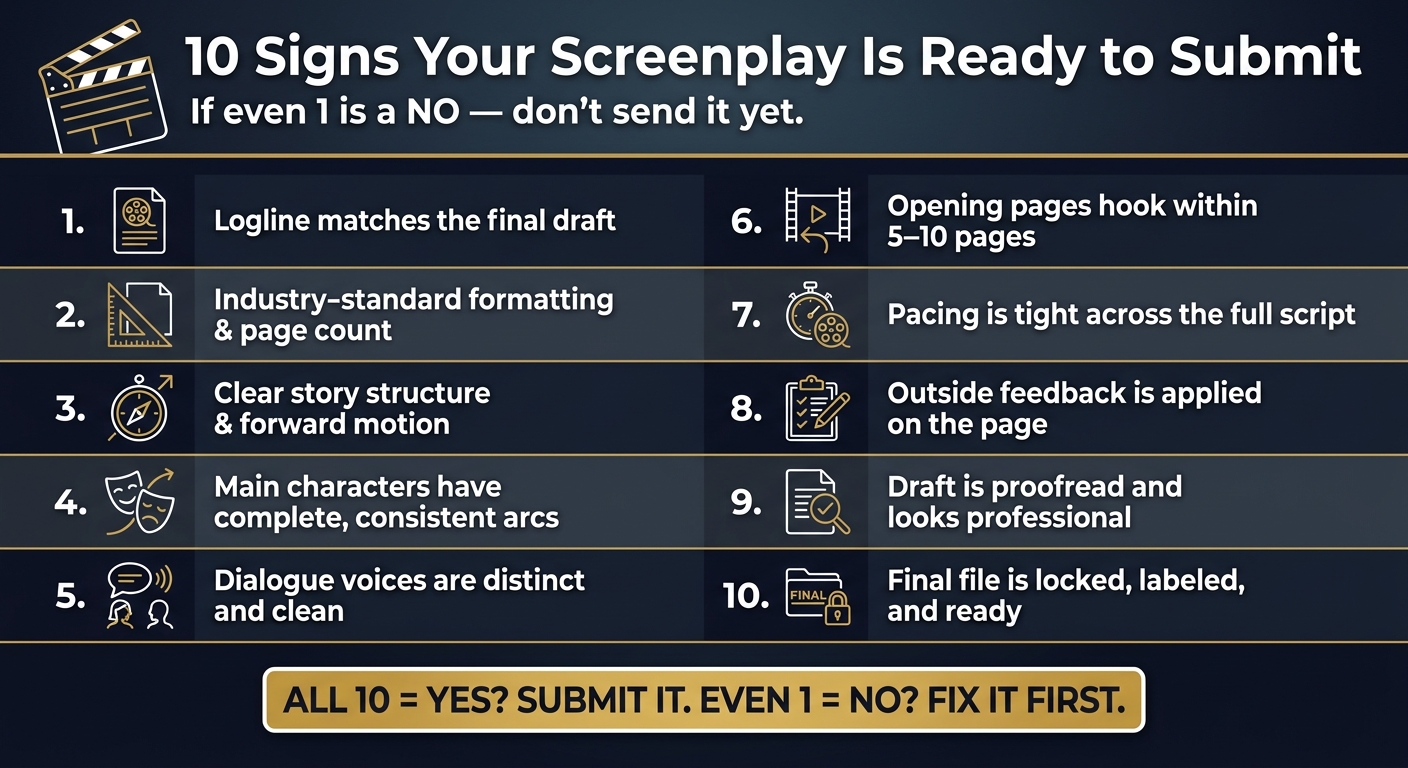
If your script doesn’t pass all 10 checks, don’t send it yet. I’d use this list as a last filter: make sure the logline matches the draft, the format is clean, the story has one clear goal, the leads have their own voices, the opening hooks fast, pacing holds through the middle, notes were fixed on the page, and the final file is proofread, labeled, and locked.
Here’s the short version: a submit-ready screenplay is not just “done.” It reads clean, moves with purpose, and avoids easy-to-fix problems that can hurt the first read. That matters because many readers make an early call within the first 5–10 pages, and weak structure, flat dialogue, or scene clutter can sink a script before the story has a chance to land.
Before I hit send, I’d check all 10 of these points:
- Logline and draft match
- Format and page count fit industry norms
- Story structure is easy to follow
- Main characters have clear arcs
- Dialogue voices don’t blur together
- Opening pages hook fast
- Pacing stays tight
- Outside notes were applied
- Proofreading is done
- Final file is locked and labeled
If even 1 out of 10 is a “no,” I’d pause and fix it first. What follows is a simple pass/fail guide to help you make that call with less guesswork.
10 Signs Your Screenplay Is Ready to Submit
What 'Ready to Submit' Actually Means
Ready to submit means the big craft issues are already handled. At that point, your script can be judged on how well it works, not on what still needs fixing.
The main test is simple: does the story have clear narrative drive? In plain English, does it feel like it's moving toward an end goal? If not, the script can read like a string of separate moments instead of one story with momentum. Festival feedback often points to this exact issue:
"Ultimately, you need to take more time to establish early on what this day is building towards, otherwise the scenes feel too much like disconnected skits without any real bearing upon one another."
The 10 signs below help you check for that standard.
A draft that's ready to submit cuts distracting camera directions, keeps scene description visual and immediate, gives main characters their own voices, trims filler dialogue and repeated gags, and removes any scene that doesn't move the goal forward. Each sign below checks one of those markers.
sbb-itb-609c31f
1. Your Logline Is Polished and Matches the Final Draft
Once the script’s core story is working, check your logline against the draft you actually have now. A submission-ready logline should name the protagonist, make the stakes clear, and reflect the script’s tone and main conflict.
The trouble starts when the logline sells one movie and the screenplay delivers another. If the logline points to a big conflict or clear end goal that the script never fully develops, the premise and the pages are no longer lining up. That gap can show up fast in coverage. Festival feedback on the screenplay Loonatoona shows the problem in plain terms:
"The overall script, however, is lacking the necessary narrative drive to make it feel like any more than a series of vignettes, tied together loosely as a plot."
A simple way to check this is to compare your logline with the summary from an AI coverage report. If those two descriptions feel like they’re talking about different films, revise the logline so it fits the current draft. You can also use the Draft Comparison and Draft History features to spot story drift before submission.
If the logline and draft are aligned, move on to format and page count.
2. Your Screenplay Uses Industry-Standard Formatting and the Right Page Count
Formatting shapes the first read. It’s not just a technical box to check. For U.S. submissions, export your final draft as a PDF, Final Draft (.fdx), or Highland (.fadein) file. Then look at the page itself with a cold eye.
Keep action lines in present tense, visual, and free of prose mistakes that pull the reader out of the script. Avoid camera directions that interrupt the flow.
Page count still matters. Think of it as a fast gut check that the script has enough on the page to support a full read.
If you’re comparing drafts, use Draft Comparison to catch formatting changes from one version to the next.
Once the page looks clean, the next test is whether the story’s structure reads just as cleanly.
3. Your Story Structure Is Clear and Easy to Follow
A script that’s ready to send out has a clear spine. Each scene should push the main conflict forward or make the stakes feel higher. When that spine isn’t there, the script can start to feel episodic.
One of the biggest red flags is vignette syndrome. The scenes may seem connected on the surface, but they don’t lead into each other in a cause-and-effect way. Festival feedback on story structure often points to "scattered story movement" - scenes that exist without pulling the story toward a clear destination.
Before you submit, go scene by scene and ask one plain question: What does this scene change? If a scene is too short or too slight to change the story, it may need to go or it may need more weight. Put your focus on scenes that move the central conflict ahead. Scriptwood's AI coverage reports can flag weak spots in structure, like sagging midpoints, subplots that drift, and pacing gaps.
When the structure is clear, contest readers, managers, and producers can judge the script on its merit instead of getting stuck on story confusion. From there, the next step is making sure the character arcs feel complete and stay consistent.
4. Your Main Characters Have Complete, Consistent Arcs
Once the story spine is clear, look at the characters carrying it. A script that's ready to submit follows each major character from page one to the last scene, with a clear change that feels earned. Their choices and reactions should line up with what the story has put them through.
A subplot can seem meaningful and still miss the mark if it never changes what a character wants or what they do next. That issue stands out even more when a character starts making choices that don't fit the person we met earlier.
A weak arc can also show up when a character's inner shift feels blurry, even if the plot keeps moving. Before you submit, check that each major character's reactions and emotional beats stay tied to that specific arc.
Scriptwood's AI coverage reports can flag dropped motivations and behavior that contradicts earlier scenes.
Once the arc is solid, the next test is whether each character sounds distinct on the page.
5. Your Dialogue Is Distinct, Clean, and Reads Well Aloud
Once your character arcs are in place, dialogue becomes the fastest way to see if those people feel alive on the page. Each voice should sound like that person - shaped by background, personality, and emotional rhythm, not by one generic style wearing different names. At the submission stage, this isn't a nice extra. It's a basic reader test. If a cold reader can't tell who's speaking without character names, the script isn't ready to submit.
One red flag shows up a lot: the supporting cast pops more than the leads. A side character may have edge, humor, or attitude, while the protagonist feels vague. That gap stands out fast. The note on Loonatoona says it well:
"It's through their dialogue voice that we're going to get the best sense of who these people are, and what makes each one of them truly unique. Really consider each character's choice of words, tone of delivery, how long their thought processes are, etc."
A table read is where weak dialogue gets exposed. You'll hear confusion right away. You'll catch repeated beats. And you'll notice when two characters sound so alike that their lines could swap places without changing the scene. Read the dialogue aloud and be tough with it. Cut any line that repeats information, slows the scene, or could belong to anyone. Every exchange should either show character or push the story ahead.
Scriptwood's AI dialogue analysis can help spot places where voices blur together or where exchanges repeat earlier information, so you can fix those lines before submission.
When dialogue is lean and each character has a clear voice, those opening pages are much more likely to land right away.
6. Your Opening Pages Hook a Reader Within the First 5 to 10 Pages
Once the dialogue is clean, the next test is simple: does the script hook the reader right away? In most cases, the first 5 to 10 pages need to make the story's goal, tone, and momentum clear. If a reader is still wondering what the script is building toward, the opening isn't ready.
On the page, that usually means the tone shows up fast, the lead characters have distinct voices that help pull the reader in, and the scene descriptions give just enough visual detail for the story to play like a movie in the reader's head.
Before you send the script out, look for a few opening-page red flags:
- weak visual setup
- passive or past-tense description that tells instead of shows
- camera directions that break the flow of the read
If those issues are still there, the opening is not submission-ready.
Scriptwood's AI coverage can flag weak pacing, structure, and narrative drive. Its draft comparison feature can also show whether your hook revisions made the opening stronger.
If the opening works, the next thing to check is whether that momentum holds across the full script.
7. Your Pacing Problems Have Been Fixed Across the Full Script
Once the opening starts working, the next test is simple: does the script keep moving through the middle and the ending? Pacing has to hold after page 10. The clearest sign you fixed it is that no scene stalls, wanders, or loses sight of the story's goal.
That means checking each scene and each exchange for drag.
Cut scenes that are too short to matter or that don't add anything new to the story. As Comedy Writing Festival feedback notes:
"Some scenes are simply too short to make an impact of their own, let alone act as a dynamic cutaway gag, and don't further the story enough to warrant inclusion."
Dialogue needs the same kind of scrutiny. If characters repeat the same beat, stall a scene, or keep talking after the point has landed, the script starts to feel slow. Even a good exchange can hurt pacing if it stays on the page too long.
Subplots can cause the same problem. If one storyline feels aimless while another is tightly plotted, the whole script can feel uneven, even if the scenes work on their own. The main drive should stay in front.
Use Scriptwood coverage and Draft Comparison to check whether your cuts did in fact tighten the script.
Once pacing feels steady, the next thing to check is whether you've already acted on outside notes.
8. You Have Acted on Outside Feedback, Not Just Collected It
Getting notes is just the start. A screenplay is ready to submit when the rewrite solves those notes on the page. The check is simple: can you look at a note and spot the fix right away?
You should be able to see that feedback was handled in the draft itself. If a note said the lead character’s voice felt too generic, the fix should show up in the dialogue. That character’s lines should now sound different from everyone else’s, not just look discussed in your revision notes.
The proof needs to live in the script, not in a side document. And once the story-level fix is there, look at the prose too. If description used to feel passive, it should now read in present tense, with cleaner, easier-to-read lines. That’s how you know the note was actually solved.
Use Draft Comparison and Draft History to check what changed, then run a fresh coverage report after major rewrites to confirm the fix and catch new issues.
9. Your Draft Package Is Proofread and Looks Professional
Once the rewrite is done, the last pass is presentation. Your submission package starts with a clean title page and a properly exported script PDF.
At this stage, small issues matter more than people think. Check for past-tense action lines and missing articles like "the" and "a." Those little gaps can make the prose feel flat or choppy, and they can break the flow of the description. Also scan for leftover camera directions such as "we see", which can pull the reader out of the scene.
When the pages are clean, review the full package itself. The title page should look clean and professional, and the PDF should keep the script's formatting intact. Scriptwood lets you export scripts as PDFs right from the platform, and Draft History helps you confirm that you're sending the locked version you plan to submit.
With the package cleaned up, the last check is making sure you send the correct locked version.
10. Your Submission Version Is Locked, Labeled, and Ready to Send
This last sign is as simple as it gets: you have one script file, and you know exactly which one you're sending. No “final_FINAL_v3” mess. No late-night panic over which draft you saved. A locked submission draft is finished, exported, and not changing anymore. At this stage, the job is making sure the file you send is the right locked version.
In practice, that means the draft has a clear name and sits at a known version. Scriptwood automatically creates a named draft each time you save, so you can review version history and export the right draft.
Before you export, give the file one last check. Make sure it's clean and fully locked. Use Draft Comparison to see exactly what changed between your last two versions and catch any accidental deletions. Then export it in the format the recipient asked for.
The script is done. The file is labeled. Nothing else is changing. Run the final checklist, then submit.
A Quick Readiness Checklist to Run Before You Hit Send
Use this simple pass/fail checklist to turn the 10 signs above into one last call.
| # | Check | Yes / No |
|---|---|---|
| 1 | Does your logline match the current draft? | |
| 2 | Is the script cleanly formatted and free of camera-direction clutter? | |
| 3 | Does the story have one clear goal and forward motion? | |
| 4 | Do your leads sound distinct on the page? | |
| 5 | Have you cut filler and repeated beats? | |
| 6 | Do the first 5–10 pages hook the reader? | |
| 7 | Have you removed or fixed weak scenes? | |
| 8 | Have you fixed the notes that mattered? | |
| 9 | Are scene descriptions active, immediate, and clean? | |
| 10 | Is your final draft exported, labeled, and locked? |
If you can mark yes on all 10, send it out.
If even one box is still blank, pause and use the tools below to spot the weak area fast.
Tools That Help You Confirm Your Script Is Ready
Once you've gone through the checklist above, the next step is simple: use tools to confirm your answers before you submit. They should back up your review, not do the thinking for you.
Scriptwood's Writing Editor and AI coverage can help you check formatting, structure, pacing, dialogue, and marketability in minutes.
For revision checks, Draft Comparison and Draft History do the heavy lifting. Use named draft saves and Draft History to track changes and lock the final version.
Inline comments and collaboration tools help you sort out open issues before you finalize the script.
When you're ready to package the file, export it as PDF, Final Draft (.fdx), Fade In (.fadein), or Fountain so it stays submission-ready.
Use the breakdown below as a final verification pass.
| Check | Scriptwood Feature | Confirms |
|---|---|---|
| Formatting | Writing Editor | Layout and page count |
| Structure & Pacing | AI Script Coverage | Narrative flow and dead zones |
| Dialogue | AI Rewrite & Chat | Voice consistency and scene clarity |
| Revision Tracking | Draft Comparison & History | Changes were implemented |
| Final Packaging | Export Formats | Clean submission file |
Conclusion
No screenplay is perfect. Submission-ready just means it meets pro standards and will be judged on the story, not on fixable mistakes.
As Comedy Writing Festival Feedback put it, "This script is very close. It just needs a bit of a cleanup and one more solid draft." That’s what submission-ready looks like in practice.
Use the 10 signs in this article as a final confidence check before you send your script to contests, fellowships, managers, agents, or producers. If it clears all 10, submit it. Then lock the draft, label it clearly, make sure the title matches the logline, and export the file format they ask for.
FAQs
What if my script passes 9 out of 10 checks?
Passing nine out of ten checks is a big step. But in most cases, it also means your script is not quite ready for professional submission.
Why? Because even one missed issue can chip away at the overall impression.
Treat that last gap as your cue for a focused final revision. Go back to the specific criterion you missed and tighten that area with care. If you want a more objective read on what’s still holding the script back, professional coverage feedback can help pinpoint the remaining weak spot.
How do I know if my opening pages hook fast enough?
Use professional script coverage tools to get focused feedback on pacing, character development, and marketability.
Your opening pages are doing their job when the early scenes set a clear direction and establish the stakes. If those pages read more like disconnected skits or aimless vignettes, the hook probably needs more punch.
Should I get feedback before every submission?
Yes. Getting feedback before each submission helps make sure your script lines up with industry standards before it lands in front of decision-makers.
Professional coverage can point out problems with structure, character work, pacing, and dialogue. That gives you a chance to fix the notes, tighten the draft, and make sure it’s ready to submit.